
Report & Export
Generate draft consultation reports, PDF summaries, raw CSV exports and automated analysis in a workflow built for UK planning consultations. Generation time depends on response volume, selected sections and analysis. Review all outputs against the source data and applicable requirements before publication or formal use.
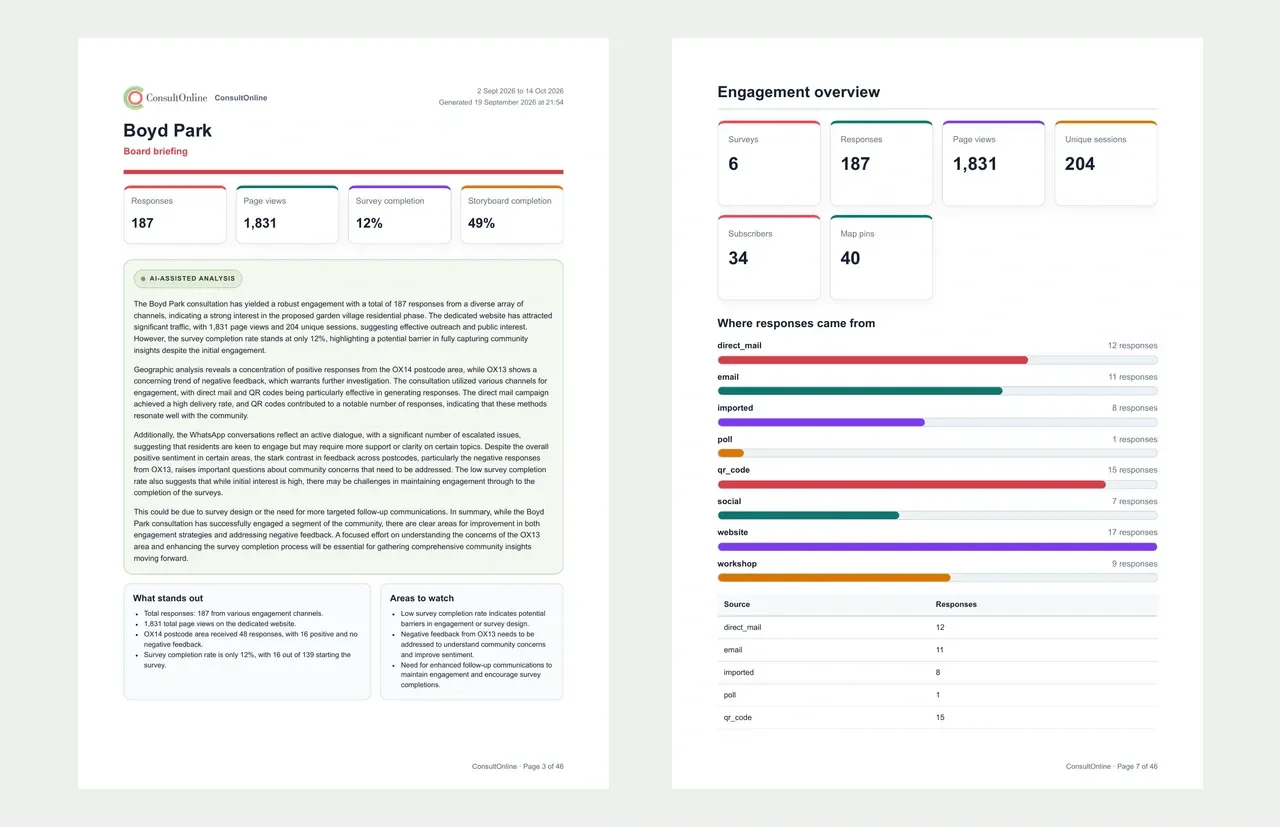
PDF Consultation Reports
Branded PDF reports with charts, response summaries and key findings. Use them as review material for planning committee papers, inquiry preparation or stakeholder briefings, with your organisation’s logo, colours and contact details.
CSV Data Export
Export raw survey responses, analytics data and interactive map pins as CSV files. Import directly into Excel, SPSS or your own analysis tools. Every data point from your consultation is available for download, giving you complete flexibility for further analysis and cross-referencing with other datasets.
Scheduled Reports
Set up automatic report delivery on a schedule that suits your team. Receive weekly progress updates during the consultation period, or comprehensive end-of-consultation summaries delivered straight to your inbox. Keep stakeholders informed without lifting a finger.
The Problem We Solve
How automated reporting reduces manual compilation
Consultation reporting can involve collating responses, checking data, identifying themes, preparing charts and formatting material for different audiences. The effort depends on the scale and channels used for the consultation.
Large response volumes make consistent review important. Structured data and a clear audit trail can reduce manual collation and help teams check how source responses are represented.
ConsultOnline can compile available platform data into draft reports, charts and exports. Automated sentiment and theme analysis supports this process, but teams should review the source data and generated findings before using them in decisions or published reports.
How It Works
From consultation data to a draft report in three steps
Select Report Type
Choose from a PDF consultation summary, CSV data export or intelligent analysis report. Apply filters for specific date ranges, question groups, response types or demographic segments. Tailor each report to its intended audience — whether that is a planning committee, a community group or an internal team briefing.
Generate Automatically
Select Generate to compile available platform data into a draft report with charts, summaries and automated analysis. Generation time depends on the number and type of responses, selected sections and analysis required. Review automated findings before using or publishing the report.
Download, Share or Schedule
After generation, download the available report or data export as PDF or CSV. Where enabled, share a read-only dashboard link or configure scheduled delivery. Generation and delivery timing depend on data volume, analysis, configuration and the receiving service.
Built for Planning
Reports built for the planning process
ConsultOnline does not just export data, it produces the specific document types that planning teams need at every stage of the consultation and decision-making process.
Consultation reports
Generate comprehensive reports that demonstrate how the community was consulted, what responses were received and how feedback was considered. Formatted to meet local planning authority requirements and ready for submission alongside planning applications.
Planning Committee Papers
Produce summary reports formatted specifically for planning committee agendas. Include response counts, key themes, sentiment breakdown and officer commentary sections. Give committee members a clear, evidence-based overview of public opinion on any application.
Section 106 Evidence
Document community priorities and concerns to support Section 106 negotiations. Quantify demand for infrastructure improvements, green space, affordable housing and other community benefits with data directly from consultation responses.
Neighbourhood Plan Summaries
Produce consultation summaries for neighbourhood plan examinations and referendums. Demonstrate the breadth and depth of community engagement with clear statistics, geographic reach data and thematic analysis of responses received during each consultation stage.
Supporting Evidence Records
Assemble recorded consultation material for appeal or public-inquiry preparation, including available audit records, response-level data and methodology notes. Teams should reconcile source coverage and obtain appropriate planning or legal review; the export does not establish evidential or legal sufficiency.
Stakeholder Briefing Packs
Create tailored briefing documents for elected members, client teams or community groups. Include or exclude specific data points, adjust the level of detail and produce a professional pack that communicates consultation outcomes clearly to any audience.
Reduce manual report preparation
ConsultOnline can reduce manual report preparation by bringing recorded responses, exports and draft analysis into one workflow. Actual time savings depend on the consultation data and report scope.
Capabilities
Every export format you need
Whether you need a polished PDF consultation report for a planning committee, a CSV export for deeper statistical analysis or a GeoJSON file for mapping tools, ConsultOnline has you covered.
Report Structure
What’s inside a ConsultOnline report
Every PDF consultation report generated by ConsultOnline follows a clear, professional structure designed to meet the expectations of planning officers, committee members and inspectors. The report opens with an executive summary that highlights the headline figures - total responses received, overall sentiment balance and the top themes identified across all open-text answers. This gives readers an immediate understanding of the consultation outcome without needing to read the full document.
The report can provide question-level breakdowns for responses included in the selected scope. Closed questions can use charts and percentages; open-text questions can include draft thematic and sentiment analysis. Demographic and geographic views depend on the data respondents supplied. Review all calculations, automated analysis and source coverage before publication or formal use.
Each report concludes with a methodology section documenting how the consultation was conducted, the channels used, the consultation period and the total reach. Appendices provide the complete raw data for anyone who needs to verify the summary findings. The entire document is branded with your organisation’s identity, formatted for print at A4 size and includes page numbers, a table of contents and proper heading hierarchy for accessibility.
Export Formats
Export formats and integrations
Download your consultation data in the format that works for your team. From print-ready PDFs to machine-readable CSV files, every export is designed to slot into your existing workflow.
PDF Reports
Draft PDF consultation reports with branding, charts, tables, A4 layout, table of contents and page numbering. Review content, calculations, accessibility and formatting before printing, sharing or committee use.
CSV Data Export
Export every survey response, demographic data point and engagement metric as structured CSV files. Compatible with Excel, Google Sheets, SPSS, R and any data analysis tool. Filter by date, question or respondent type before export.
Raw Data Download
Export the response data included in the selected consultation scope, with available timestamps, metadata and attachments. Check the export against source records, access permissions and retention requirements before using it for audit, archive or import.
Scheduled Reports
Configure automatic report generation and delivery on daily, weekly or custom schedules. Reports are generated and emailed to your chosen recipients automatically — ideal for keeping project teams and elected members updated throughout a consultation period.
Shareable Dashboard Links
Generate secure, shareable links to live consultation dashboards. Give stakeholders, clients or community groups read-only access to real-time results without needing a ConsultOnline account. Control access with expiry dates and password protection.
Print-Ready Formatting
PDF reports use an A4 layout with print-oriented margins, charts and typography. Review the generated output, including colour use and accessibility, before publication.
FAQ
Frequently asked questions
Ready to streamline your consultation reporting?
Reduce manual report preparation. Generate draft PDF reports and automated analysis, then review the outputs against the source data before publication.
More features to discover